Platform information checked 2026-10-26. A supported computer or modern browser; no specific RAM minimum is recorded in the reviewed installation guide. Homebrew must already be installed for this macOS command. Configure exchange-rate fetching separately if offline operation matters.
Check dimensions and convert units in repeatable text calculations.
Free local calculator and web interface
Numbat is free software under MIT or Apache-2.0; no paid software edition is required for its CLI or public web calculator. You supply the device and storage. Currency-rate fetching can contact an external service. It is a scientific calculator, not a symbolic algebra system or WolframAlpha knowledge database.
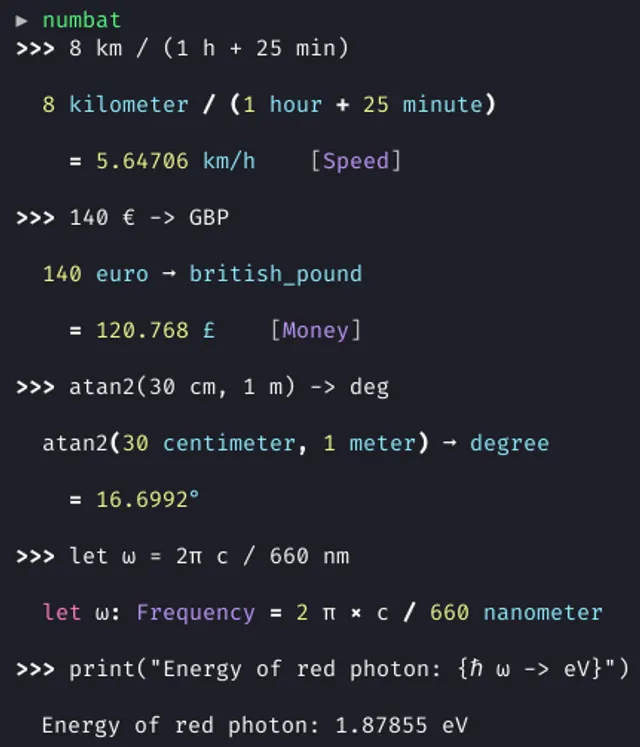
Calculate with physical units and dimension checking in a terminal or browser, with variables and reusable calculation files. Visit the project website to check the currently available deployment options.
Release status
Public provider installation or download instructions reviewed; AltStack did not execute this software.
Install on your computer · Instructions checked 2026-10-26
Follow the official Numbat installation page for your operating system, or open numbat.dev for the browser interface.
For macOS with Homebrew installed, use the documented brew install numbat command. Windows and Linux have separate package and binary instructions.
Start the installed CLI with numbat and enter a small calculation such as 2 m + 30 cm.
Use a conversion such as 2 m + 30 cm -> cm and inspect the displayed expression and physical dimension.
Save reusable inputs to a .nbt file. Review the exchange-rates configuration before using currencies or assuming the session stays offline.
Numbat is free software under MIT or Apache-2.0; no paid software edition is required for its CLI or public web calculator. You supply the device and storage. Currency-rate fetching can contact an external service. It is a scientific calculator, not a symbolic algebra system or WolframAlpha knowledge database.
Self-hosting & quickstart specs
License
MIT
Deployment
Local CLI or provider-hosted browser interface
Free edition / costs
Free local calculator and web interface. Numbat is free software under MIT or Apache-2.0; no paid software edition is required for its CLI or public web calculator. You supply the device and storage. Currency-rate fetching can contact an external service. It is a scientific calculator, not a symbolic algebra system or WolframAlpha knowledge database. Pricing evidence.
Devices / hardware
A supported computer or modern browser; no specific RAM minimum is recorded in the reviewed installation guide. Homebrew must already be installed for this macOS command. Configure exchange-rate fetching separately if offline operation matters.
brew install numbat
Documented provider installation command for the stated platform and prerequisites. AltStack reviewed the instructions and did not run this command.
Documentation checked 2026-10-26; command not executed by AltStack.
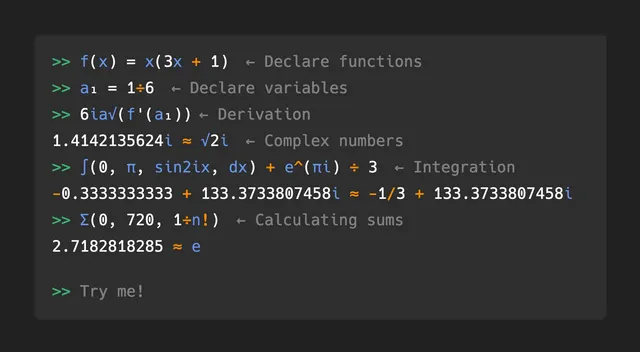
Evaluate scientific expressions and custom functions in a local terminal.
The MIT-licensed calculator has no required subscription or hosted-model allowance. Your device and optional build tools are separate. Numerical integration, differentiation and approximate roots can be inaccurate; Kalker does not replace WolframAlpha’s full symbolic engine or knowledge service.
Handle calculations and common unit conversions in one Android app.
The provider describes Unitto as free, with no ads, in-app purchases or analytics. Ordinary calculations and unit conversion run locally; currency conversion needs Internet access. The GPL-3.0 source and usable F-Droid edition are available. The browser version is alpha, has limited language/theming support and loses user data on reload. This is a calculator/converter alternative for part of a WolframAlpha workflow; it does not include WolframAlpha’s knowledge database, cloud symbolic engine or every guided Pro solution. The alpha web build includes additional GPL-2.0 and MIT components with separate provider notices; the Android edition is the free app reviewed here.