

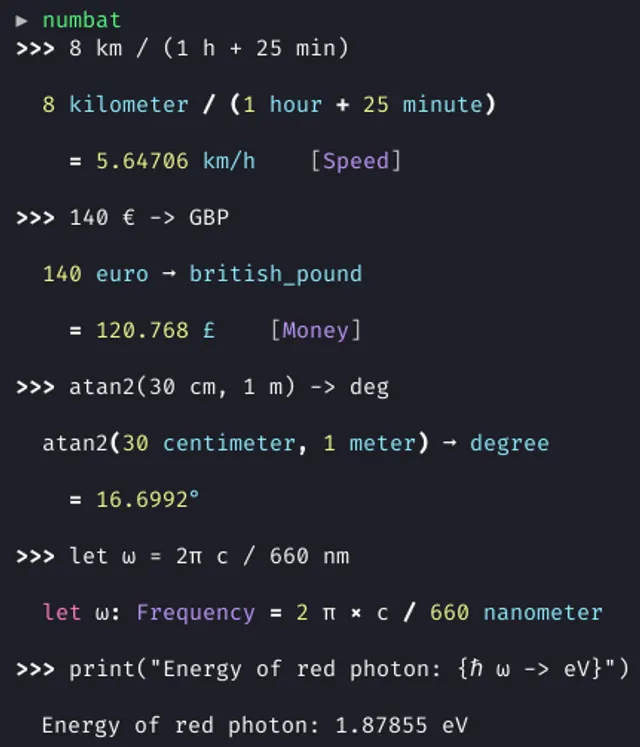
Numbat is a free, open-source scientific calculator and language for calculations with physical units. Its dimension checks are useful when a number alone could hide a mistake, such as mixing a distance with a duration. This guide follows one short route-planning calculation from installation to a reusable file, with separate notes for the browser version and network access. AltStack reviewed the official documentation and repository on October 26, 2026. We did not install or execute Numbat; the results below are expected arithmetic values, not recorded application test results.
1. Decide whether a unit-aware calculator fits the job
Choose a small, non-sensitive calculation that you can check independently. A journey length and duration are convenient practice inputs: they produce a speed, and you can verify the result with ordinary division. Numbat can retain units in an expression, infer dimensions and reject incompatible combinations. It also supports variables and custom functions for a longer calculation.
The software is available under MIT or Apache-2.0, without a required calculator subscription. You provide the computer, storage and any package-manager setup. The public browser interface offers a way to try the language without installing a CLI. Numbat is not a full symbolic algebra system, a WolframAlpha knowledge database or a spreadsheet with a graphical grid. A user needing symbolic integration or a conventional button-based calculator should compare those requirements before moving a workflow.
2. Install through the documented platform route
Open the official installation page linked below and select your operating system. On macOS with Homebrew already installed, the documented command is brew install numbat. On Windows with Scoop already configured, the page lists scoop install main/numbat. Linux users should choose a listed distribution package or a compatible release binary; the available package name and installation method depend on the distribution. Existing Rust users can also review the documented cargo install numbat-cli route. These are alternatives, not steps to run one after another.
Read the selected package's current architecture and dependency notes before installing. Use the provider's release links rather than a download site that repackages the app. When the CLI is installed, numbat starts an interactive session and numbat --help shows its current options. If the command is not found, first check whether the selected installation completed and whether its executable directory is on your command path. No particular RAM minimum is asserted here because the reviewed installation page does not specify one.
3. Start with a calculation you already understand
Enter 18 + 6 * 4 and compare the answer with the expected value, 42. Multiplication takes precedence over addition. Next enter (18 + 6) * 4, whose expected value is 96. This small change lets you check whether the grouping you intended matches the expression on screen. Keep both inputs when recording what you tried.
Use parentheses generously when mixing division and units. Numbat gives implicit multiplication a higher precedence than slash division, so an expression that looks natural in prose can group differently from what you expect. Read the pretty-printed interpretation as well as the final number. This is especially useful before introducing longer variable names or nested functions. A plausible-looking number is not evidence that the inputs describe the right physical problem.
4. Add and convert quantities with compatible units
Try 2 m + 30 cm. The quantities describe the same physical dimension, so the expected total is 2.3 metres. To request centimetres explicitly, enter (2 m + 30 cm) -> cm; the expected value is 230 cm. The conversion operator changes the representation of a compatible quantity. It does not make an incompatible expression meaningful.
For contrast, try a disposable input such as 2 m + 3 s and inspect the diagnostic. Adding a length and a time is a useful mistake to catch before using the result elsewhere. Correct the source expression rather than removing the units just to silence the message. Temperature notation has additional offset rules, so use the linked conversion documentation before treating Celsius or Fahrenheit like ordinary multiplicative units. Keep this first exercise with simple length and time units until the grouping and conversion behavior are familiar.
5. Name inputs so another person can review them
Introduce the practice values with let trip_distance = 12 km and let trip_duration = 40 min. Then evaluate trip_distance / trip_duration -> km/h. The expected average speed is 18 kilometres per hour: 40 minutes is two thirds of an hour, and 12 divided by two thirds is 18. This is an original practice example, not a claim about a measured journey.
Numbat variables are immutable within a definition, but a later let definition can reuse a name. If you want to consider a different duration, write a new definition explicitly and keep the changed input with the result. Names such as trip_duration make a saved file easier to review than a sequence of unexplained numbers. State the assumptions alongside the calculation: an average speed is not a promise about stops, traffic or the time needed for a real trip.
6. Save the inputs and reopen a repeatable calculation
The command-line interface supports save trip-notes.nbt to save the current session history to a chosen file. Choose a new filename in a folder you control, then inspect the text with an editor. For a shorter reusable program, create a plain-text trip.nbt containing the two let definitions and the final conversion expression from the previous step, each on its own line. Run that file later with numbat trip.nbt. Keep the input file, not just a screenshot of the answer.
Make a separate copy before changing the duration. A filename such as trip-30min.nbt records the scenario more clearly than overwriting the only working example. Save any explanatory notes and the application/package version with it. The CLI and browser have different command sets: the web interface does not document the same save command. A retained terminal history or browser tab should not be your only backup for a calculation you intend to reuse.
7. Add one check before changing a longer program
Numbat provides assert_eq for exact or approximate equality and assert for a Boolean condition. In the practice program, an additional line such as assert_eq(trip_distance / trip_duration, 18 km/h, 0.01 km/h) records the expected result with a small explicit tolerance. An assertion that passes does not print a success certificate; the documentation says a failed assertion raises a runtime error.
This is useful when you reorganize a file and want to notice an unintended change. Write down why the expected value is correct, then change one input at a time. For rounded measurements, use a tolerance appropriate to the measurement rather than demanding arbitrary precision. An assertion only checks the condition you wrote. It cannot establish that a sensor reading, an assumption or a unit copied from another document was correct in the first place.
8. Control currency-rate traffic before assuming offline use
Read the customization page before using confidential inputs or treating a local CLI as an assurance of no network access. Numbat's documented configuration includes an exchange-rates section. Its example sets fetching-policy to on-startup, with on-first-use and never as other choices. The page describes fetching reference currency rates from the European Central Bank. Ordinary fixed-unit arithmetic and live exchange-rate data have different dependencies.
The provider documents numbat --generate-config for generating a default configuration and gives separate configuration-folder locations for Linux, macOS and Windows. Review an existing configuration before changing it. To disable currency fetching, follow the documented exchange-rates setting with fetching-policy = "never"; the guide says currency identifiers then produce unknown-identifier errors. A failed or disabled rate request should not be replaced with a guessed rate. Package downloads, updates, your terminal and separate backup software have their own network and storage behavior.
9. Treat the browser's shareable URL as part of your data
The browser interface at numbat.dev has an interactive terminal with history navigation, completion and a reset command. Its documentation says that entered lines are appended to the URL so another person can open a calculation through that link. This is convenient for a harmless example; it is also a reason to inspect the address before sharing it.
Use the journey example rather than customer identifiers, private financial assumptions or access credentials. A copied link can travel through a messaging service, browser history, screenshots or a shared document. The documented reset command clears the interpreter state and URL, but it is not a promise to erase copies that you already sent elsewhere. If another person needs a repeatable calculation, include the meaning of each input and the units alongside the link. Agree on which version is the one being reviewed.
10. Understand the limits of numeric precision
The number-notation documentation says Numbat uses 64-bit floating-point numbers, with approximately 15 to 16 significant decimal digits. That is different from arbitrary-precision arithmetic. A displayed decimal can be rounded, and very large integers can lose distinctions that matter to a calculation. Do not treat a longer-looking answer as proof of greater accuracy.
Use the exact small arithmetic checks in this guide to establish a basic workflow, then decide what precision your actual task needs. For a measurement, keep its original precision and units. For an exact symbolic expression or an unusually large integer, compare a tool designed for that requirement. The provider's comparison page also distinguishes Numbat from calculators with complex-number or matrix functionality. Choose by the calculation you need to perform rather than expecting every scientific tool to implement the same features.
11. Troubleshoot by reducing the input
If the journey example fails, start again with 12 km / 40 min, then add the conversion and variables separately. Check spelling, parentheses and whether a name was redefined earlier in the session. Use a fresh disposable session when trying to distinguish a syntax problem from retained definitions. For a unit error, inspect the dimensions rather than repeatedly changing the number.
When asking the project for help, prepare the smallest non-sensitive input, the expected arithmetic and the actual diagnostic. Include the operating system and installed package version. Avoid posting a full session history before reviewing it for private data. If the terminal's appearance differs from the provider screenshot, distinguish a font or display issue from a failed calculation. The artwork on this page is an upstream example capture, including historical currency values; it is not a benchmark or a record of AltStack executing the software.
12. Keep a small adoption checklist
Before moving a useful calculation, confirm that you can install or open the chosen interface, interpret a simple expression, convert a unit and save the inputs in a format you can inspect. Reopen one saved file and verify its arithmetic independently. Check the currency configuration and the contents of a browser share link if either feature is part of your routine.
Keep your previous calculator, source measurements and original files available while evaluating this workflow. Numbat can be a useful free alternative for numerical and unit-conversion tasks, while another tool may remain necessary for symbolic algebra, a visual worksheet or a particular data source. A successful small practice calculation is a concrete starting point for your own evaluation; it does not certify every function, installation platform or real-world result.
Official instructions and sources
Numbat repository: features and MIT/Apache licensingOfficial platform installation instructionsCommand-line modes, session history and saving filesOperator precedence and expression interpretationCompatible units and conversionsVariable definitions and rebindingAssertions and debuggingConfiguration and exchange-rate fetchingBrowser commands and calculation-sharing URLsNumber representation and precision limitsProvider comparison and known feature limitsOriginal AltStack guide by Sushil Kumar Sah. Installation steps follow provider documentation; they do not imply testing on every supported device.