Platform information checked 2026-10-28. Select an official Windows installer, macOS disk image or Linux AppImage/package. Create a disposable pattern with source-licensed samples, then check your own audio/MIDI setup. Only documentation and image bytes were inspected here. Drum-machine and sequencing task overlap with a DAW, not a complete replacement for recording, mixing, third-party plugins or a paid sound library.
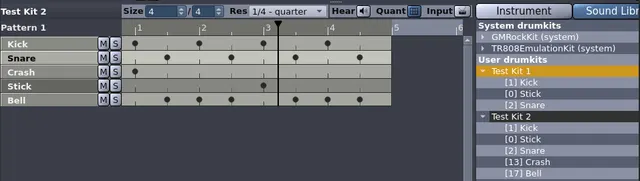
Program drum patterns and arrange songs with a desktop drum sequencer, sample controls and MIDI support for practice or original music.
Free drum sequencer
The GPLv2-or-later application and official desktop releases are free. Optional drumkits, plugins and sample material have their own licenses; an audio interface, storage and other studio equipment can cost extra. Drum-machine and sequencing task overlap with a DAW, not a complete replacement for recording, mixing, third-party plugins or a paid sound library.
Program drum patterns and arrange songs with a desktop drum sequencer, sample controls and MIDI support for practice or original music. Visit the project website to check the currently available deployment options.
Release status
Provider downloads or installation route reviewed; AltStack did not install or execute the application.
Install on your computer · Instructions checked 2026-10-28
Choose the provider’s official Windows installer, macOS disk image or Linux release/package and review the matching installation manual.
Check the audio and MIDI configuration for the device you intend to use before starting a pattern.
Build a small disposable rhythm using samples whose license allows your intended use; a free application does not clear every external drumkit.
Save the test song and check its playback and export before a larger project. Back up your song and sample files independently.
Drum-machine and sequencing task overlap with a DAW, not a complete replacement for recording, mixing, third-party plugins or a paid sound library. These are documentation-based starting steps; AltStack did not install the application or execute its packages.
Self-hosting & quickstart specs
License
GPL-2.0
Deployment
Local application on the provider-supported free platforms
Free edition / costs
Free drum sequencer. The GPLv2-or-later application and official desktop releases are free. Optional drumkits, plugins and sample material have their own licenses; an audio interface, storage and other studio equipment can cost extra. Drum-machine and sequencing task overlap with a DAW, not a complete replacement for recording, mixing, third-party plugins or a paid sound library. Pricing evidence.
Devices / hardware
Select an official Windows installer, macOS disk image or Linux AppImage/package. Create a disposable pattern with source-licensed samples, then check your own audio/MIDI setup. Only documentation and image bytes were inspected here. Drum-machine and sequencing task overlap with a DAW, not a complete replacement for recording, mixing, third-party plugins or a paid sound library. No universal RAM minimum was verified.
No one-line command has been verified for Hydrogen; follow its official installation instructions instead of guessing a Docker image or installer.
Cut and trim video without re-encoding or quality loss.
The LosslessCut repository edition is available under GPL with documented installation or build instructions and no required source-license subscription. Build/setup work, your device or compute and storage remain your costs. This check covers that source edition; managed services, premium extensions and commercial relicensing, if offered, are not included or price-verified.
Audacity explicitly states that the editor is and will remain free for everyone. Upstream describes GPLv3 licensing with component exceptions. Your hardware and optional external plugins/services may cost separately.
Ad-free music player that streams from multiple sources.
Official FAQ explicitly says Nuclear is completely free, with no ads, trackers, premium tier or in-app purchases. README and AGPL source identify the desktop player.
MuseScore Studio is free GPLv3 notation software without a trial or paid feature tier. Windows and macOS downloads are available without MuseHub; Linux AppImages are also offered. MuseScore.com subscriptions, mobile products, and separately supplied sounds or plugins have their own terms and are not included in this desktop-software listing.
Create beats, melodies and arrangements with local instruments and samples.
LMMS source is available under GPLv2 with a documented local build and release workflow and no required source-license subscription. Your computer, audio hardware, storage and optional third-party plugins or samples are separate costs. This does not establish current binary compatibility or every plugin license.