Platform information checked 2026-10-28. Linux PipeWire desktop app; no Windows or macOS build is asserted. The provider warns to keep hardware devices as the system defaults rather than selecting Easy Effects virtual devices.
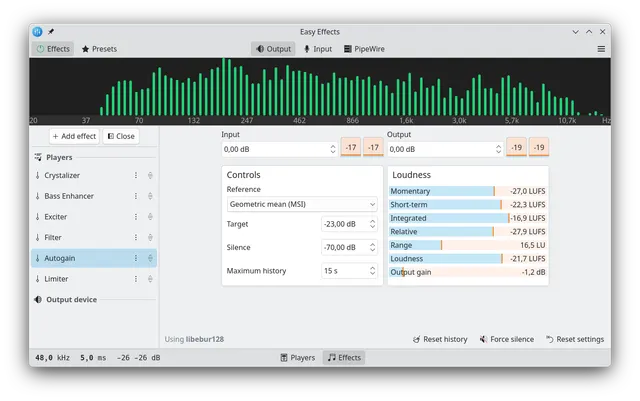
Apply equalization, compression and other audio effects to PipeWire playback or microphone streams on Linux.
Free Linux audio effects
Easy Effects is GPL-3.0-or-later software, and the project-linked Flathub distribution is free. It requires a Linux PipeWire audio environment; distribution packages may require separate effect plugins while the provider-linked Flatpak includes them. It covers selected equalizer and effects tasks rather than Boom 3D platform support or proprietary surround processing. Your hardware and optional external audio/preset rights are separate; it does not provide a licensed music catalog.
Apply equalization, compression and other audio effects to PipeWire playback or microphone streams on Linux. Visit the project website to check the currently available deployment options.
Release status
Provider Linux/PipeWire instructions and the free official-linked Flatpak reviewed. AltStack did not install or execute the application.
Install on your computer · Instructions checked 2026-10-28
Check that the Linux session uses PipeWire; use the provider documentation to confirm compatibility before changing the audio stack.
Open the project README and use its distribution-package instructions or its official Flathub link for com.github.wwmm.easyeffects.
Keep the real audio hardware as the system default input/output, following the README warning.
Start with low listening volume and a harmless audio source. Use the matching version documentation to apply one effect to the intended application or microphone path.
Review preset/export controls before larger changes, and disable processing if the result is unexpected. No installation, sound test or command was executed by AltStack.
Use github.com/wwmm/easyeffects and its linked manual/store. Upstream expressly disclaims easyeffects.org; no installation command was executed for this review.
Self-hosting & quickstart specs
License
GPL-3.0
Deployment
Local Linux PipeWire audio processing
Free edition / costs
Free Linux audio effects. Easy Effects is GPL-3.0-or-later software, and the project-linked Flathub distribution is free. It requires a Linux PipeWire audio environment; distribution packages may require separate effect plugins while the provider-linked Flatpak includes them. It covers selected equalizer and effects tasks rather than Boom 3D platform support or proprietary surround processing. Your hardware and optional external audio/preset rights are separate; it does not provide a licensed music catalog. Pricing evidence.
Devices / hardware
A Linux desktop with PipeWire is required; a plain PulseAudio server is not supported. Keep hardware devices as the system defaults. Distribution packages may need separate effects plugins, while the provider-linked Flatpak includes them. No RAM minimum was verified.
No one-line command has been verified for Easy Effects; follow its official installation instructions instead of guessing a Docker image or installer.
Ad-free music player that streams from multiple sources.
Official FAQ explicitly says Nuclear is completely free, with no ads, trackers, premium tier or in-app purchases. README and AGPL source identify the desktop player.
MuseScore Studio is free GPLv3 notation software without a trial or paid feature tier. Windows and macOS downloads are available without MuseHub; Linux AppImages are also offered. MuseScore.com subscriptions, mobile products, and separately supplied sounds or plugins have their own terms and are not included in this desktop-software listing.
Create beats, melodies and arrangements with local instruments and samples.
LMMS source is available under GPLv2 with a documented local build and release workflow and no required source-license subscription. Your computer, audio hardware, storage and optional third-party plugins or samples are separate costs. This does not establish current binary compatibility or every plugin license.
Listen to music from your own Jellyfin, Navidrome or Subsonic server.
Feishin is GPL-3.0 software with free desktop and web clients. You need your own compatible music server, credentials and licensed music. Server hosting, storage and network costs are separate; it does not connect to Spotify or provide a paid streaming catalog. Optional lyrics and external integrations have their own data handling.
An extensible music server for a computer or Raspberry Pi.
The Apache-licensed core is free and plays local audio files and internet radio. It runs on a computer with audio output and uses a web client or an optional MPD extension for control; hardware, storage and third-party client costs are separate. It includes no Spotify, Audible or Netflix subscription catalog. Service extensions have separate requirements: Mopidy-Spotify requires Spotify Premium and its current README warns that third-party access-token streaming has been disabled, so do not rely on it as free or guaranteed Spotify playback.