AI TOOL DETAILS

TreeSheets

Organize nested-grid documents locally, with an optional token-authenticated connection that lets an external AI agent inspect and script the open document.
TreeSheets

Free organizer · external AI costs separate
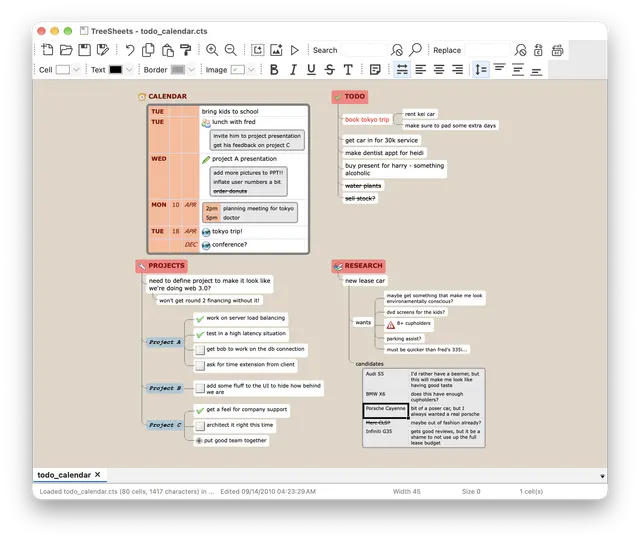
TreeSheets product preview
Product image: Wouter van Oortmerssen and TreeSheets contributors; bundled Nuvola artwork by David Vignoni · Zlib · Original image; layout scaled to fit. Provider macOS demo with a historical sample document; not an AltStack execution. Full notice.Logo: Wouter van Oortmerssen and TreeSheets contributors; bundled Nuvola artwork by David Vignoni · Zlib · Original image; layout scaled to fit. Official project logo; no endorsement implied. Full notice.

What does it cost?

The listed option is free to use. Hosting or model usage may still cost money.

TreeSheets is free Zlib-licensed desktop software. You supply the computer, storage and backups. Its optional local agent socket is off by default; connecting an external AI assistant has that provider’s own account, model and service terms and can cost separately. The application does not include a paid-model allowance or a managed team workspace.

Provider pricing checked 28 Oct 2026.

Installation and setup

Install on your computer · Instructions checked 2026-10-28

  1. Select a Windows, macOS or Linux package from the official release page or the provider-linked Linux Flathub channel, and review platform requirements and package-signing caveats.
  2. Open a disposable nested-grid document and organize a small outline or planning table before moving important information into the application.
  3. Save a local document and verify it can be reopened; keep separate backups before importing or automating important files.
  4. Optional external-agent integration is off by default. Read the official Agent Socket document before enabling it, use only a trusted agent and a non-sensitive test document, and close the socket when finished. AI-provider accounts, processing and charges are separate.

A hierarchical organizer, not an Excel workbook or Visio file compatibility claim. Verify any formula, import/export and collaboration requirements before moving data. These are provider-documented starting steps; AltStack did not install or execute the application.

Self-hosting & quickstart specs

License
Zlib
Deployment
Local desktop application with opt-in external AI-agent connection
Free edition / costs
Free local organizer · optional agent costs. TreeSheets is free Zlib-licensed desktop software. You supply the computer, storage and backups. Its optional local agent socket is off by default; connecting an external AI assistant has that provider’s own account, model and service terms and can cost separately. The application does not include a paid-model allowance or a managed team workspace. Pricing evidence.
Devices / hardware
Official README supplies Windows, macOS and Linux builds, including Linux AppImage/deb and Flathub routes. The documented macOS distribution is unsigned; follow current provider requirements rather than assuming all packages are signed. Hardware, storage and backups are supplied by you; no universal RAM minimum was verified.

No one-line command has been verified for TreeSheets; follow its official installation instructions instead of guessing a Docker image or installer.

TreeSheets provider setup documentation

What can you use it for?

Source code and self-hosting

Read the repository for the license, installation steps, and operating costs.

Source repositoryView the full software profile

Learn how to use this type of tool

Read a practical guide before choosing a plan or setting up a workflow.

AI agents and automation: start with one useful workflow

Does this tool help you?

This preference stays on your device. It does not change public rankings.