Platform information checked 2026-10-16. Use the web app from a hosted or self-hosted instance. The official README documents an installable PWA on Android, iOS and desktop browsers; no native store app is implied.
The complete MIT-licensed self-hosted app is free with no seat limit. You supply the server, backups and optional AI model provider; hosted AI APIs can bill separately and local models use your hardware. Cloud has a 14-day trial, then EUR 5/month or EUR 50/year per person at the current early-bird annual rate; Cloud has no continuing free plan.
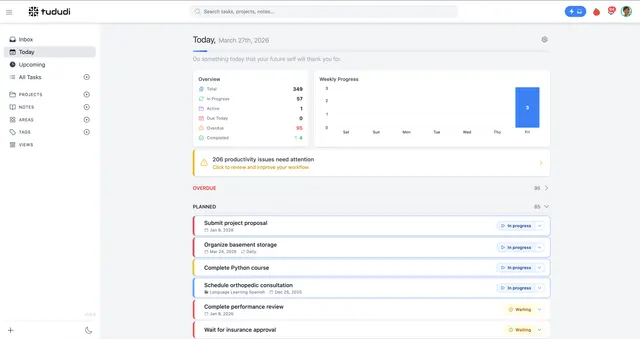
tududi · Provider repository screenshot · v1.0 interfaceProduct image: Copyright 2024, 2025 Tududi Developers · MIT · Original image; layout scaled to fit. Unchanged screenshot committed by the provider. It shows an earlier UI date and is not a live AltStack installation test. Full notice.Logo: Copyright 2024, 2025 Tududi Developers · MIT · Original image; layout scaled to fit. Official repository asset used for independent product identification and linked to the provider; no endorsement implied. Full notice.
About tududi
Organize tasks, recurring work, projects and notes, with optional AI planning and an MCP connection for agents. A self-hosting option is recorded for this project. Review the official deployment instructions and maintenance requirements before running it yourself.
Release status
The complete MIT-licensed app can be self-hosted. Cloud hosting is a separate paid service; AI is optional.
Set up your own server · Instructions checked 2026-10-16
Install Docker on the computer or server that will host tududi, and prepare persistent folders for the database, uploads and backups.
Use the official README Docker example with chrisvel/tududi:latest. Set your own account email, a strong password and a generated session secret; mount the persistent folders at /app/db, /app/uploads and /app/backups.
Start the container with the README configuration and port 3002 mapping. Open http://localhost:3002 on the host, or your configured server address, and sign in with the credentials you supplied.
Create a first task, then group work into projects or areas and add tags or notes as needed. The documentation links First Steps for the initial workflow.
Before remote use, follow the production configuration guide for the actual origin, HTTPS and reverse proxy. Keep your persistent folders backed up and follow the release upgrade notes when updating.
Self-hosting includes the complete MIT-licensed application. Cloud is a separate paid service with a 14-day trial. Core task management does not require AI; if you enable the AI Assistant, configure a provider or an operator-side local model according to docs/13-ai-assistant.md. External model APIs can charge separately. Read the current upgrade notes because database-volume paths changed in earlier releases.
Organize notes, documents, and projects in one workspace.
The cloud Personal plan is USD 0 with limits. Pro costs USD 20/member/month billed monthly, or USD 16/member/month billed annually. Self-hosting and optional external models use your own resources and may incur separate costs.