Platform information checked 2026-10-17. A web app served by your own Docker host, with an installable PWA. The README notes that PWA installation does not work under a configured subpath. No native desktop or Android download is implied.
The MIT-licensed app has no software subscription. You provide Docker, a host and persistent storage for task and configuration files. Infrastructure and backups can cost separately. Its narrow Markdown Kanban workflow does not include all Trello team, automation or administration features.
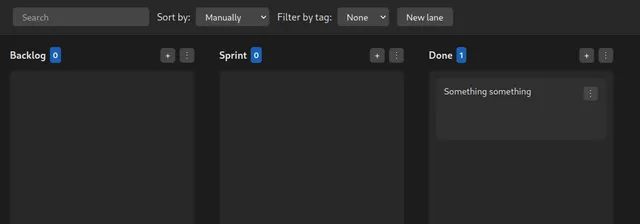
Tasks.md · Provider repository screenshot · Markdown Kanban boardProduct image: Matheus Baldissara and contributors · mit · Original image; layout scaled to fit. First-party repository media, distributed under the repository root license; tree review found no separate media license or restriction. Logos are used only to identify the original product, with no endorsement claim. Full notice.Logo: Matheus Baldissara and contributors · mit · Original image; layout scaled to fit. First-party repository media, distributed under the repository root license; tree review found no separate media license or restriction. Logos are used only to identify the original product, with no endorsement claim. Full notice.
About Tasks.md
Arrange Markdown task files into a Kanban board with lanes, tags and a browser-based editor. A self-hosting option is recorded for this project. Review the official deployment instructions and maintenance requirements before running it yourself.
Release status
A public stable release and the documented Docker image are available. The maintainer deliberately keeps this a small, low-maintenance project.
Set up your own server · Instructions checked 2026-10-17
Prepare Docker and create two persistent folders for your Markdown tasks and application configuration.
Copy the official Docker Compose example. Mount your task folder at /tasks and your configuration folder at /config; set PUID and PGID to the file-owning user where appropriate.
Start the documented baldissaramatheus/tasks.md container with docker compose up -d and open the host address on port 8080.
Create lanes for your workflow, add a card and edit its Markdown content. Each lane is stored as a directory and each card as a file.
Keep both mounted folders backed up. For access beyond a trusted local network, put authentication and HTTPS in front of the app.
The README documents a narrow, low-maintenance Kanban tool and no built-in user authentication. Source inspection of backend/server.js found routes served directly without a login layer; do not publish it openly. BASE_PATH supports reverse-proxy subpaths, but the README says PWA installation requires the root path. These are provider-documented setup steps, not an installation test.
Organize notes, documents, and projects in one workspace.
The cloud Personal plan is USD 0 with limits. Pro costs USD 20/member/month billed monthly, or USD 16/member/month billed annually. Self-hosting and optional external models use your own resources and may incur separate costs.